Buffer class in Node.js#
Wander into Node.js built-in class Buffer
and explore the world of binary data, and play around the equivalent conversion between
hexadecimal, decimal, plus other characters at easy level.
💻 01001001 01010101
Introduction#
Binary#
Get to know about binary data.
- Computers actually work on ones
1and zeroes0. - A single state represents
1 bit(e.g.0or1). - 1 byte is equal to 8 bits (e.g.
01001001) - A single character is equal to 1 byte.
Counting in Binary#
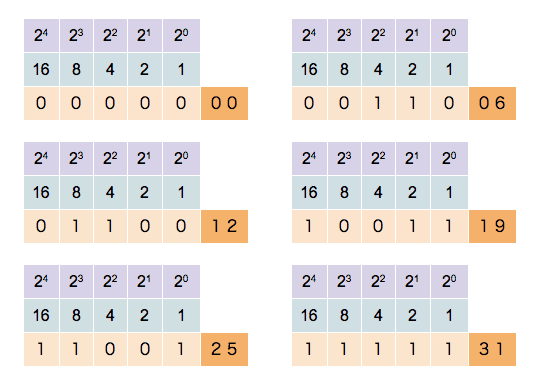
| Decimal | Binary |
|---|---|
| 0 | 0 |
| 1 | 1 |
| 2 | 10 |
| 3 | 11 |
| 4 | 100 |
| 5 | 101 |
This table shows a decimal value and its equivalent in binary.
Check this section to check how to convert decimal to binary using Node.js.
Check this blog post to check how to manually convert decimal to binary or "bitwise"
Character System#
| System | Base | Characters |
|---|---|---|
| Binary | 2 | 0 1 |
| Decimal | 10 | 0 1 2 3 4 5 6 7 8 9 |
| Hexadecimal | 16 | 0 1 2 3 4 5 6 7 8 9 a b c d e f |
Buffer#
Apply and experiment on it using Node.js built-in Buffer class.
Code along
Better learning comes when you're doing hands-on experience
- Prerequisite: Node.js installed (
v20+is recommended) - Create
index.mjsfile. (Rename it anyway you want) - Execute the file via command:
node index.mjs
| index.mjs | |
|---|---|
1 2 3 4 5 6 | |
- This may be optional when Node.js export
Bufferas global - When encoding is not specified, it will default to
utf-8
String to Buffer#
<Buffer ...>: indicates that the following hexadecimal values represent a buffer.49 55: These hexadecimal values represent the content of the buffer. Each pair corresponds to a single byte.
Hexadecimal to Decimal#
const hex = 16; // (1)!
console.log(parseInt('49', hex)); // 73
console.log(parseInt('55', hex)); // 85
- Remember that hexadecimal is
base16. Review this section
The parseInt(string, radix?) will convert the string to integer
which we can use to get its equivalent ASCII character.
Decimal to Character#
console.log(String.fromCharCode(73)); // I
console.log(String.fromCharCode(85)); // U
Use loop as a better alternative:
const buffer = Buffer.from('IU', 'utf-8');

buffer.forEach((byte) => {
  console.log(String.fromCharCode(byte));
}); // (1)!

// Output:
// I
// U
-
This also works:
for (const byte of buffer) {
  console.log(String.fromCharCode(byte));
}
When using loop, each iteration contains a decimal value instead.
While
<Buffer ...>contains hexadecimal values, and NOT decimal.
Decimal to Binary#
const buffer = Buffer.from('IU', 'utf-8');

buffer.forEach((byte) => {
  console.log(byte.toString(2)); // 2 = base2 or binary
});

// Output:
// 1001001
// 1010101
More examples using this counting in binary table above.
const numbers = [0, 1, 2, 3, 4, 5];

numbers.forEach((n) => {
  console.log(n.toString(2));
});

// Output:
// 0
// 1
// 10
// 11
// 100
// 101
Buffer to String#
console.log(buffer.toString()); // defaults to 'utf-8'
console.log(buffer.toString('utf-8'));

// Output:
// IU
// IU
TextEncoder and TextDecoder#
TextEncoder and TextDecoder have a method called encode and decode, respectively,
that both returns Uint8Array which is the closest equivalent to Buffer.
See reference
new TextEncoder().encode('IU'); // Uint8Array(2) [ 73, 85 ]

Buffer.from([73, 85]).toString(); // IU
new TextDecoder().decode(new Uint8Array([73, 85])); // IU
Tip
Since Node.js Buffer is not available in web or client-side, then you can use this alternative.
Also, TextEncoder and TextDecoder is available in Node.js as well.
Conclusion#
There you have learned the equivalent and conversion of data between binary,
decimal, hexadecimal and alphabet characters
using Buffer class built-in from Node.js.
| System | Value |
|---|---|
| Characters | IU |
| Hexadecimal | 49 55 |
| Binary | 1001001 1010101 |
| Decimal | 73 85 |
You can also use Buffer to convert your characters to base64
const buffer = Buffer.from('IU', 'utf-8');

console.log(buffer.toString('base64'));
// SVU=

console.log(Buffer.from('SVU=', 'base64').toString());
// IU
In browser, the equivalent is using:
window.btoa('IU');
// SVU=

window.atob('SVU=');
// IU
This is just the basics of using Buffer, but there is much more to it.
Buffer is particularly useful when dealing with binary protocols,
such as reading and writing files, network communications, cryptographic operations,
and other scenarios where handling binary data is necessary.